Money Eco: Budget / Expense
- 4.7
- Rating
- 10.00K
- Installs
- Free
- Price

 Analysis by App-foxy
Managing money on a shared phone is rarely as simple as opening an expense tracker and entering a few purchases. One person may buy groceries, another may pay a bill, and someone else may only want a quick view of where the household budget is going. Money Eco: Budget / Expense caught my attention because it approaches personal finance through recording, organization, and visual reports rather than trying to become a full banking service. After spending time with it, I see it as a practical tool for households that want a clearer routine, provided everyone agrees on what gets recorded and who is allowed to see it.
The app comes from Apponance, Inc. and is listed as a free finance app for everyone. Its focus is money management, expense tracking, budgeting, and visualizing personal-finance information. That combination sounds straightforward, but the useful part is how it can turn a scattered collection of small purchases into a pattern you can actually discuss. I would recommend it most to people who are willing to enter transactions consistently and want a visual checkpoint before making changes to their spending.
How Money Eco Works When More Than One Person Uses the Device
A realistic household example is a couple sharing a tablet or an older phone kept in the kitchen. One person buys food during the week, the other handles transport and household supplies, and neither has a complete picture of the total until the end of the month. In that situation, Money Eco can serve as a common log. The value is not that it magically knows who spent what; the value is that the household can create a habit of recording purchases in one visible place.
You May Also Like

 Blood Strike: 2.5 Anniversary
Blood Strike’s Loadouts Turn Every Drop Into a Tactical Gamble
A close look at Blood Strike’s custom loadouts: how fast access to signature weapons reshapes its battle royale rhythm, rewards preparation, and narrows the gap between fights.

 Pandora - Music & Podcasts
Pandora’s Music Is Easy to Start, but Harder to Recover
Pandora’s strength is its low-effort path from a seed to a station. Its weak spot is how much confidence it asks you to place in connection, setup, and quiet recovery.

 8 Ball Pool
 Is Built on Rivalries, Rematches, and Routine
A close look at the rivalries, rematches, shared routines, and unanswered safety questions that turn a quick pool match into a persistent mobile community.

 Samsung Music
’s Quiet Strength Is Playing What You Already Own
Its reach comes less from spectacle than from dependable access to a personal library. That simplicity is both the app’s strongest retention engine and its ceiling.

 AccuWeather: Weather Radar
AccuWeather Review: A Quick, Clear Forecast for Everyday Decisions
For everyday plans, the best forecast is the one you can understand quickly. AccuWeather makes rain timing, radar, and local conditions easy to act on, with a few trade-offs.

 Hill Climb Racing
Why Hill Climb Racing Still Turns Crashes Into One More Run
A tiny car, a bumpy hill and one more upgrade: Hill Climb Racing keeps resurfacing because its simple chaos makes every near-miss feel personal.
More From Our News Desk
View All News


I found that this shared-device approach requires a little discipline. The person entering an expense should make the description clear enough for someone else to understand later. “Shop” is less useful than “weekly groceries,” while “bus” is clearer when it identifies whether it was a commute or a family outing. Small details like these make the reports more meaningful because a category total is only helpful when the people reviewing it remember what went into it.
The most important practical rule is to agree on the recording routine before relying on the reports. If one household member enters every purchase and another enters nothing, the resulting picture may look precise while being incomplete. I would use the app as a shared record only after deciding whether expenses are added immediately, collected and entered each evening, or reviewed together once a week.
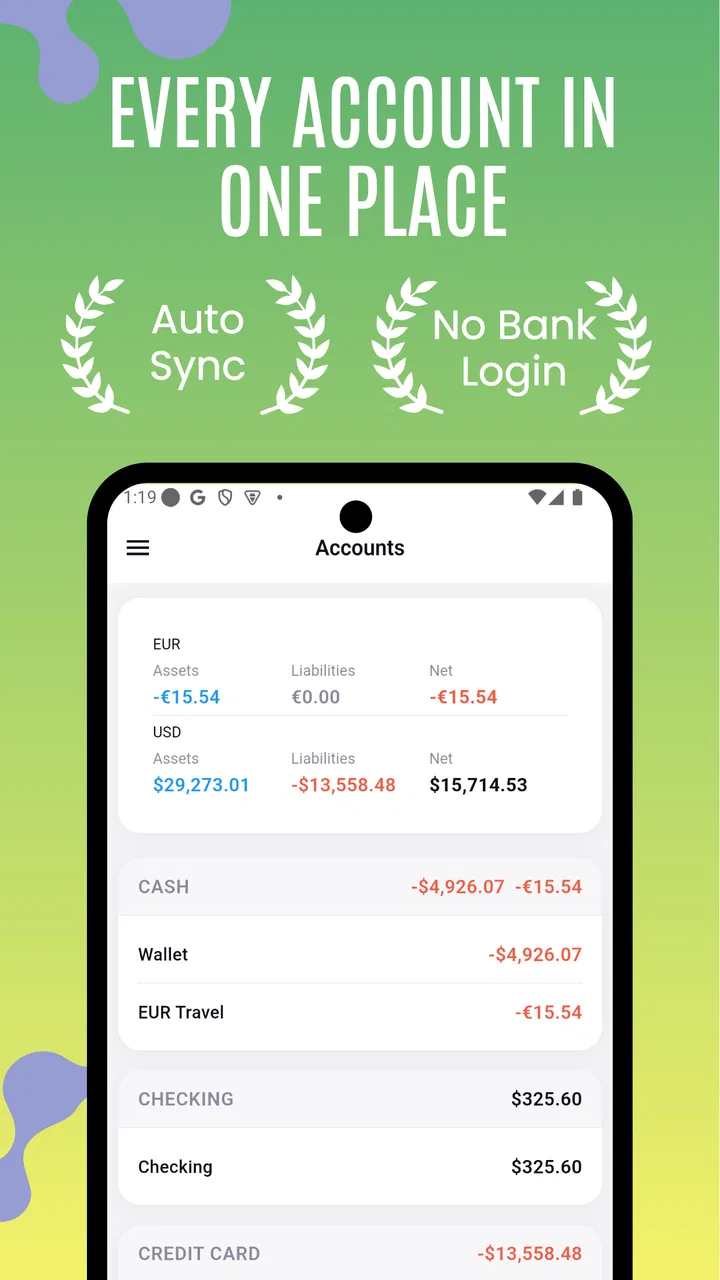
This is also where the app differs from a bank application. A banking app normally reflects transactions from a connected account, while Money Eco is better understood as a deliberate tracking workspace. That makes it more flexible for cash purchases and spending that may happen outside one shared account, but it also places responsibility on the user. If automatic transaction collection is your priority, a banking tool or a dedicated service built around account connections may suit you better.
What to decide before sharing the phone
Shared use works best when the household separates the device question from the money question. A person may be comfortable letting another family member enter a grocery expense but not comfortable exposing every personal purchase. Since Money Eco is being used as a finance record, I would establish whose information belongs in the app and whose information should remain private before creating a common workflow.
For a household budget, I would keep entries focused on agreed shared costs: food, utilities, transport, school-related spending, or home supplies. Personal purchases can be left out if they are not part of the shared plan. This avoids the common mistake of treating one mixed list as if it represents the finances of every person using the device.
Another useful boundary is deciding who edits older entries. Corrections are normal, especially when a purchase is entered quickly, but changing a previous amount or category can alter the visual picture that everyone is using. A simple household rule—such as asking before changing another person’s entry—can prevent confusion without turning the app into a source of arguments.
I would also avoid using a shared device as a substitute for separate financial records when the users have very different needs. A teenager tracking pocket money, a parent managing household costs, and a roommate splitting bills may all need different levels of detail. One shared list can work for a narrow purpose, but it becomes awkward when it is expected to represent several independent budgets at once.
Turning reports into a conversation instead of a scorecard
The visualization side is most useful when it helps the household ask better questions. Rather than saying that one category is “bad,” look at whether it increased because of a one-time purchase, a seasonal change, or a repeated small expense. A report can reveal a pattern, but it cannot explain the reason on its own. That interpretation still belongs to the people using it.
My preferred routine would be a short weekly review. First, check whether all shared expenses were entered. Next, look for categories that changed noticeably. Finally, decide on one action for the following week, such as planning grocery trips more carefully or setting aside money for an upcoming recurring cost. This keeps the app from becoming a passive archive and gives the visual reports a practical purpose.
A less obvious benefit is that the app can help distinguish frequency from size. A large purchase may attract attention, but several modest purchases can quietly shape a category total. Reviewing the entries behind a visual summary helps identify which kind of problem the household has: an occasional shock or a habit that repeats. That distinction matters because the solution is different in each case.
There is also a useful trade-off in manual tracking. Entering an expense creates a moment of awareness that automatic categorization often skips. On the other hand, manual entry can be forgotten when people are busy. I would not judge the app by whether it eliminates effort; I would judge it by whether the effort is small enough for your household to maintain.
Setup boundaries and the question of separate accounts
Before handing the device to another person, I would test the workflow with a few ordinary entries and decide whether the categories and descriptions make sense to everyone. That trial run is more valuable than immediately importing a large amount of history, because it exposes disagreements about naming and ownership early. A shared record should be understandable to the least finance-focused person using it.
The app is available at no charge, which makes experimenting easy. It also includes in-app purchases ranging from less than a dollar to under fifteen dollars per item. I would treat those optional purchases carefully in a shared setting: decide who is allowed to approve them, whether they belong in the household budget, and whether the app is being used enough to justify any paid addition. The free starting point is helpful, but household spending rules should apply to app purchases too.
Money Eco runs on Android devices using an operating system from version seven onward. That broad compatibility is convenient for an older shared phone, although the experience can still depend on the device’s screen size and speed. On a small phone, detailed reports may be easier to review in short sessions, while a larger shared screen is more comfortable for a couple comparing categories together.
The current release is version 7.1.0. When several people depend on one finance record, I would update the app deliberately rather than casually changing the setup immediately before a budget review. The sensible habit is to check that the existing entries and routine still behave as expected after an update, especially if the shared device is older or used by someone who is not comfortable troubleshooting apps.
Coordination without pretending the app is a household manager
One of my strongest impressions is that Money Eco can support coordination, but it does not replace coordination. The app can hold the record and present the spending picture; it cannot decide whether two people are entering the same purchase, whether a refund should be recorded, or whether an expense belongs to the household. Those decisions need a human agreement.
A simple convention helps. For example, the person who pays records the expense, while the other person only checks the weekly summary. If both people enter purchases, they can mark them with consistent descriptions rather than relying on memory. The exact convention matters less than using the same one every time.
For shared bills, I would record the full household expense in one place rather than entering separate fragments unless the household specifically wants to track reimbursements. Otherwise, the report may show several entries that look like separate costs even though they belong to one bill. This is a small workflow choice, but it can make the visual report much easier to interpret.
Another practical tip is to review unusual entries immediately. If a category suddenly looks high, do not wait until the end of the month to guess why. Check the descriptions while the purchase is still fresh. This reduces the chance that a shared report becomes a source of distrust simply because nobody remembers what an ambiguous entry meant.
Compared with a spreadsheet, the app feels more approachable for quick entries and visual review. A spreadsheet offers greater freedom for custom formulas, reimbursement calculations, and multiple people working in separate columns, but it can feel like work before the budget is useful. Compared with a notebook, Money Eco is better suited to spotting patterns across entries, while a notebook may feel faster for someone who dislikes screens. The right choice depends on whether your household values visual summaries enough to maintain digital records.
Age, trust, and the limits of a shared finance tool
The everyone age rating makes the app approachable for a broad household audience, but age suitability is not the same as financial readiness. A younger user may be able to enter an expense while still needing an adult to explain categories, totals, and the difference between a planned purchase and an available balance. I would introduce it as a learning tool rather than handing over responsibility for the household budget.
Trust matters just as much as age. If several people can use the same device, they should understand that an entry is part of a shared record and should not be changed casually. The app can encourage transparency, but it should not be used to monitor someone’s private spending without their agreement. For adults sharing a household, it is healthier to define the shared scope clearly than to treat every visible transaction as automatically open for discussion.
This is also why I would be cautious about putting personal and household expenses together. A parent might want a broad family overview, while an adult child using the same device may need a separate boundary. If the app cannot fit the privacy arrangement your household expects, separate records or a different finance solution may be more appropriate.
Money Eco is not the right choice for someone who wants a completely automatic experience, formal bill splitting, or a replacement for account security. It is also not ideal for a user who will resent entering each purchase. The app’s strengths appear when the user accepts a small amount of manual organization in exchange for a clearer overview.
What the app’s reception suggests, and what it does not prove
The app has an average rating of 4.7 from around fifty ratings, with more than ten written reviews, and it has passed ten thousand installs. Those figures suggest a modest but positive user base rather than the scale of a mainstream banking platform. I would take that as encouragement to try it, not as proof that every household will find the workflow effortless.
That distinction is important for finance apps. A high rating can reflect satisfaction with the basic idea, but your decision should depend on whether the actual routine fits your household. If you need a shared ledger with highly specialized rules, extensive automation, or professional accounting functions, popularity is less relevant than those requirements.
For me, the app’s strongest case is a small household that wants a common visual checkpoint without committing to a complicated financial system. It can make a weekly conversation more concrete, especially when the alternative is relying on memory. Its weakest case is a group with unclear ownership, inconsistent participation, or a strong need to keep personal and shared finances completely separate.
My household verdict after using it
I would recommend Money Eco: Budget / Expense to a person who wants a straightforward way to record spending and understand it visually, especially when the app is used for one clearly defined household purpose. It is free to start, rated for everyone, and supported on older Android devices, which lowers the barrier for a shared phone or tablet. Apponance, Inc. has positioned it around the practical heart of budgeting: seeing where money goes and making the record understandable.
My recommendation comes with a condition: decide the boundaries first. Choose whether the record is personal or shared, agree on who enters and edits expenses, and keep descriptions consistent. Those steps may sound ordinary, but they determine whether the reports become useful evidence or just another incomplete list.
If your household wants automatic bank synchronization, formal permissions, or separate private accounts with advanced collaboration, I would look elsewhere. If you want a manageable manual tracker that can turn everyday purchases into a conversation about priorities, this app is worth trying. In my experience, its value is less about entering one expense and more about creating a repeatable habit that several people can understand and maintain.
That makes it a good fit for a couple, a small household, or an individual who prefers visual feedback over a notebook. It is not a magic solution for financial disagreements, and it will not compensate for missing entries. Used honestly and within clear boundaries, though, it offers a calm, accessible way to bring scattered spending into one view. For shared-device budgeting, consistency and trust are the features that matter most.
FAQs for Money Eco: Budget / Expense
01What is Money Eco: Budget / Expense used for?
Money Eco: Budget / Expense is a personal finance app designed to help you record income, track daily spending, organize transactions into categories, and understand where your money goes. During testing, its main value was the simple overview it provides for household budgeting. It can be useful for users who want clearer financial habits without relying on complicated accounting software.
02Can I create budgets and monitor my spending with Money Eco?
Yes, the app is intended to help users set spending limits and compare their actual expenses with planned amounts. You can generally organize costs by categories such as food, transportation, bills, shopping, or entertainment. This makes it easier to identify areas where you are overspending. However, the usefulness of the budget depends on entering transactions consistently and keeping categories properly organized.
03Does Money Eco: Budget / Expense connect directly to my bank account?
Users should check the current app description and permissions before downloading because financial apps may differ in how they handle transaction entry and account synchronization. Money Eco is primarily useful as a manual expense and budget tracker, so you should not assume that every bank or card account will connect automatically. If synchronization is unavailable, transactions must be added by hand.
04Is Money Eco: Budget / Expense safe for managing personal financial information?
The app may contain sensitive details such as income, expenses, account labels, and financial notes, so privacy should be considered before use. Review its privacy policy, requested permissions, backup options, and any available security features before entering confidential information. Avoid storing passwords, card PINs, or complete banking credentials in expense descriptions, even when the app appears convenient.
05Is Money Eco: Budget / Expense suitable for beginners?
Money Eco: Budget / Expense can be a suitable starting point for beginners because the basic concept is straightforward: add income, record expenses, assign categories, and review the resulting summaries. New users may need a short adjustment period to understand recurring entries, reports, or budget settings. It is best suited to people willing to maintain their records regularly rather than expecting fully automatic financial management.
Pros
- Simple interface makes daily expense tracking quick and approachable.
- Useful budget categories help organize spending across different areas.
- Clear summaries make it easier to spot spending patterns over time.
- Supports better financial awareness without requiring advanced accounting skills.
- Lightweight design should work smoothly on most modern Android devices.
Cons
- May lack advanced investment and portfolio management features.
- Manual transaction entry can become tedious for frequent purchases.
- Budget insights depend on users consistently recording accurate expenses.
- Some useful tools may be restricted to a paid version or subscription.
- Limited bank integration could require extra effort to keep data updated.

Money Eco: Budget / Expense
Gallery